UERSIS is drone thermal inspection software that keeps the temperature in every frame, so your client reads real numbers in a browser instead of looking at a coloured picture.
A thermal job usually ends as a stack of coloured JPEGs pasted into a PDF. The temperatures stay behind on one laptop, and when your client asks how hot that spot was, someone has to go back and look it up. Your client sees the colours but cannot check a number, and the matching daylight photo sits in another folder.
Upload your DJI thermal JPEGs from the H20T, M30T, Mavic 3T or Matrice 4T, and UERSIS reads the temperatures stored inside each radiometric file. Upload the matching visual photo and it pairs with the thermal frame by file name, for side by side and wipe views. If you corrected emissivity in DJI's Thermal Analysis Tool, upload its export with the same name and UERSIS uses that instead. If a frame has no temperature data, the page says so, because UERSIS never guesses a temperature.
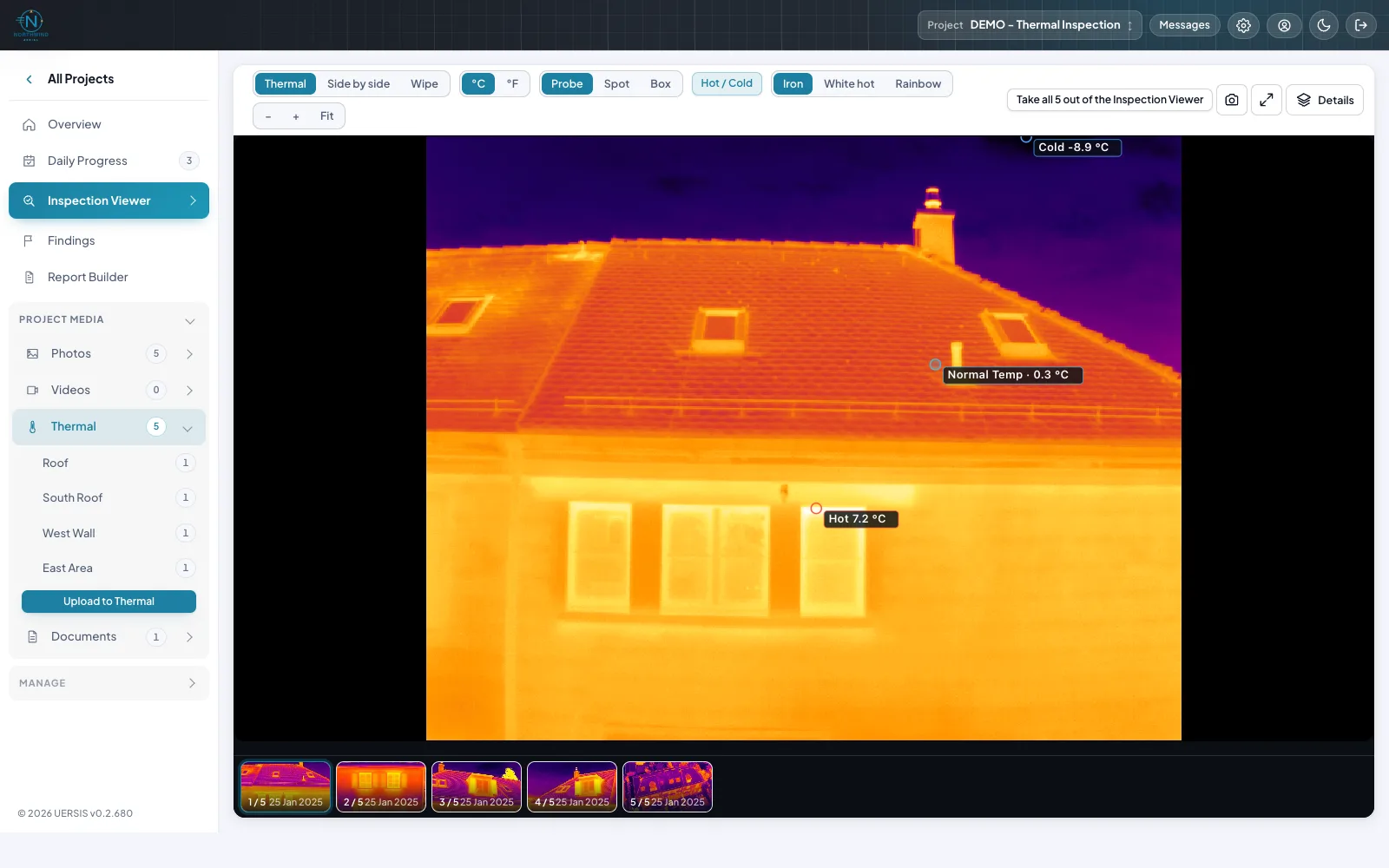
Every frame shows its minimum, maximum and mean, and the probe reads the temperature under the cursor. Pin a spot to compare it with the first one, drag a box to read the temperatures inside it, and set an isotherm to colour everything above a temperature in gold. Name a mark for the customer and it shows for everyone who opens the frame. Flag the frame and it becomes a finding with a severity that keeps its temperatures.
Your client opens the same frames in your Hub, hovers for temperatures and switches palettes. In the Report Builder, the thermal block puts the live viewer, with your saved marks, into the online report, and the PDF prints each frame with its temperatures. Your client marks each finding Scheduled or Repaired as they act on it, so the question "how hot was it?" is answered with a hover, not a call to your office.
Questions
Which thermal cameras does UERSIS read?
DJI radiometric JPEGs whose names end in _T, from the H20T, M30T, Mavic 3T and Matrice 4T. For other makers, upload a temperature export (CSV or TIFF) with the same base name as the image. When a frame has both, the DJI Thermal Analysis Tool export is used, because it may carry corrected emissivity.
Does my client need thermal software to read temperatures?
No. Your client signs in to your Hub in a browser, for free, and reads temperatures with the probe. On Thermal Advanced they also use spots, boxes, isotherms and palettes. Saving marks and flagging findings stay with your team.
Which plans include thermal?
Thermal Basic comes with Solo: view frames and read the temperature at any point. Thermal Advanced comes with Team, Business and Enterprise; on Solo it can be the plan's one included pick, or $20 a month, and adds spots, boxes, isotherms, side by side and wipe, and marks your client can see. On Focus, at $99 a seat a month, pick the Inspection Viewer and Thermal Advanced comes with it. Every plan starts with a 14-day free trial.